
Warehouse Management System Software
Run receiving, quality inspection, putaway, picking, packing, dispatch, transfers, stock counts and production material flow on scanned transactions, with every movement traceable and reconciled against your ERP.
Core WMS Capabilities
Eight integrated modules covering every step from the receiving dock to the delivery truck.
Inbound Receiving & GRN
Receive against open purchase order lines, with short, over and damaged quantities recorded as exceptions.
Incoming Quality Inspection
Stock is quarantined on arrival, inspected by one person and released by another before it can be used.
Bins, Zones & Putaway
Warehouse, zone, rack, shelf and bin structure, with suggested putaway bins confirmed by scan and the bin map available as a 3D floor view.
Stock Ledger & Lot / Serial Control
Append-only ledger by item, bin, lot, serial and status. Corrections are reversals, never edits.
Allocation & Picking
FEFO-then-FIFO allocation from sales orders, backorders, and pick tasks in bin walk order.
Packing & Dispatch
Picks scanned into cartons, with carton labels, packing lists, partial shipments with carrier tracking, and a 3D load view for container shipments.
Transfers & Stock Counts
Bin, warehouse and plant transfers with in-transit custody, and blind cycle counts with recount and approval.
Reports & Reorder Advice
Ageing, expiry, slow movers, fulfilment and count accuracy, plus min / max levels suggested from 90 days of usage.
Built for Warehouse and Production Operations
How Warehouse Operations Run Digitally
Receive
Goods scanned in against the purchase order, with shortages and overages recorded at the dock.
Inspect
Quarantined stock inspected, with the result recorded by one person and approved by another.
Put Away
Suggested bin confirmed by scanning item then bin, so stock is findable from that moment.
Allocate & Pick
Orders allocated FEFO then FIFO; pickers walk the bins in order and scan every line.
Pack & Dispatch
Picks packed into labelled cartons and dispatched with carrier and tracking details.
Count & Reconcile
Cycle counts, variance approval and ERP stock reconciliation close the loop.
See the Floor the Way the Stock Ledger Sees It
Our WMS renders bin status, pick faces and dispatch loads as 3D views, so a supervisor can spot stock that is stuck or wrongly staged by looking at the floor, instead of reading through a stock report.
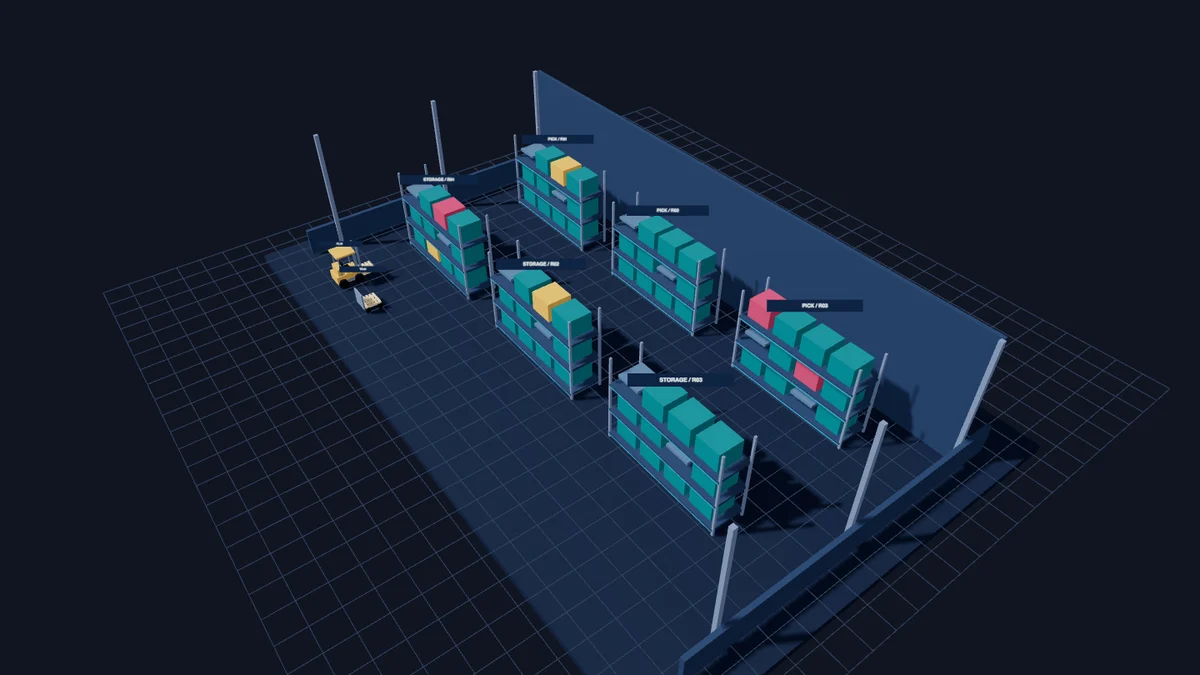
Warehouse Floor View
Storage racks and pick faces laid out as they stand on the floor, with every bin coloured by its status: available, on hold, or blocked. Stock that cannot be picked is visible before it holds up an order.

Container Load View
Dispatch cartons placed in loading sequence against the door, so the team can confirm the plan before the container is sealed and the shipping paperwork is raised.
Rendered with sample warehouse data.
> staged to dispatch bin · reserved for SO line
Every Movement Is a Scanned Transaction
Stock only moves when someone scans the bin and the goods. No typed quantities from memory, no paper pick lists, and no gap between what the system says and what is on the shelf.
- qr_code_2Item, bin, lot, serial and carton labels in QR and Code 128, printed on thermal label printers.
- smartphoneWorks with USB scanners, phone or tablet cameras, and typed codes. It also reads your ERP item barcodes.
- historyReprints are permission-controlled and logged, and every scan is kept in the audit trail.
Built to Work Beside Your ERP, Not Replace It
Your ERP stays the financial book of record. The WMS runs the physical work and keeps both sides in agreement.
Master Data Sync
Items, item groups, units of measure, barcodes, warehouses, customers and suppliers synced from the ERP.
Open PO & SO Lines
Purchase, sales and production orders matched line by line, with warnings when the ERP changes an order already in progress.
ERP Posting Queue
Every receipt, shipment, transfer and count produces its ERP document in the same transaction, and is never posted twice.
Daily Stock Reconciliation
ERP on-hand compared with WMS stock per item and warehouse, with each difference classified and explained.
SAP Business One Ready
Integrated with SAP Business One through the Service Layer, and adaptable to other ERP systems.
Controlled Posting Ownership
We agree with your finance team which system posts which document before go-live, so no stock is booked twice.
From Raw Material to Finished Goods
Six steps on the production floor, and what the system does when a step does not go to plan.
Plan & Check
Production orders and BOMs come from the ERP; the WMS shows what each order still needs against free stock.
- Material short: reserve a partial kit, or replenish from the raw material store
- ERP order cut after kitting: warning raised, WMS progress kept
Kit & Stage
Components reserved FEFO / FIFO and scanned from their bins into the staging bin, held for the order.
- Component unavailable: approved substitute or extra issue
- Order postponed: staged stock put back into storage
Issue to Line
Production scans what it takes. Manual components are issued on handover; backflush components stay reserved.
- Issued by mistake: issue reversal
- Unused or damaged material: returned to stock
Produce
Line stock and work in progress are tracked, moved and counted on the production floor.
- Defect found: put on hold or sent for rework
- Unusable material: scrapped, approved by a second person
Receive Goods
Good and rejected units received separately with new lots or serials; backflush consumed in the same posting.
- Rejected units: blocked and isolated
- Duplicate serial: refused and logged as an exception
QC & Put Away
Finished goods pass outgoing QC, then are put away and ready for allocation to sales orders.
- QC fails: NCR raised for scrap, rework or use as is
- Disassembly: good parts to stock, damaged parts blocked
Governance Built Into Every Step
Roles & Permission Matrix
Roles configured by module, compared side by side, with no one able to grant themselves more access.
Maker-Checker Approvals
No one approves their own QC result, count variance or scrap, and approvals can be delegated.
Warehouse Scope
Users only see and move stock in the warehouses and plants they are assigned to.
Full Audit Log
Every scan, posting, approval and setting change is recorded with who, when and why.
Who Should Use Our WMS
Manufacturers on SAP / ERP
Close the gap between ERP stock and what is actually on the shelf and on the production line.
Distribution & Fulfilment Teams
Pick and dispatch faster and more accurately, with fewer mis-shipments and customer claims.
Quality-Regulated Operations
Lot and serial traceability and recall readiness that stand up to customer and regulatory audits.
Ready to Bring Control to Your Warehouse?
Our consultants map your receiving, storage, production and dispatch flow with your team before we configure the system.
Request a Consultationarrow_forward